Sequencer
Role
The Sequencer module orchestrates automatic acquisition for an astrophotography session. It executes a list of sequence lines, each defining the filter, exposure duration, and number of images to acquire. Frame type, gain and offset are shared by the whole sequence rather than set per line. FITS files are saved automatically into a folder tree organised by object and filter, and the module can request camera cooling, autofocus, and guiding around each line as needed.
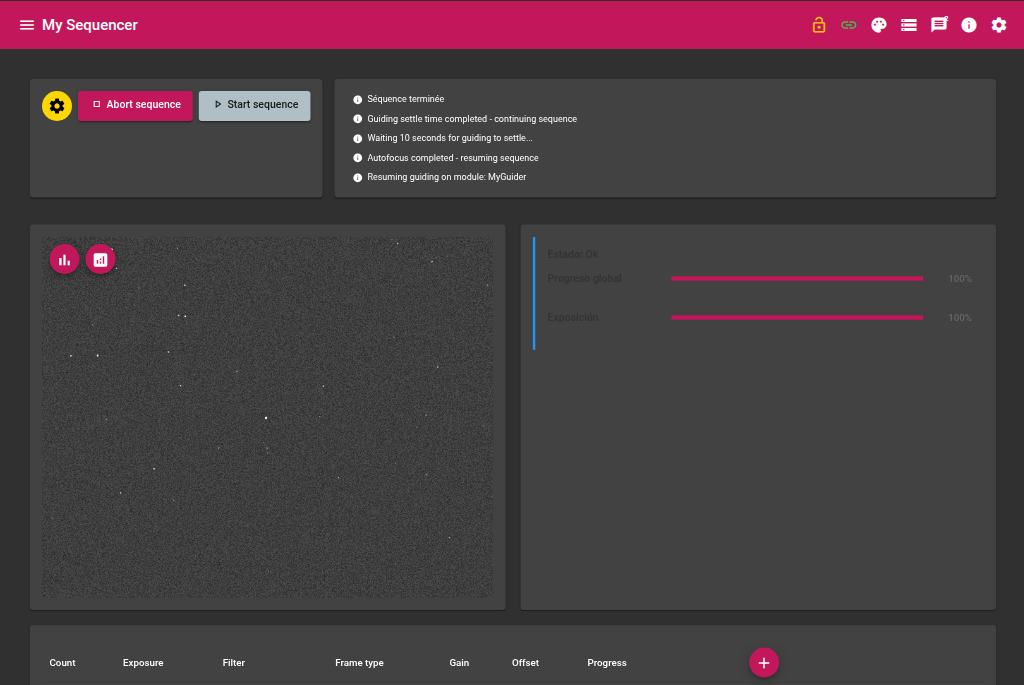
Required devices
| Device | Role |
|---|---|
| Camera | Image acquisition, and cooling if enabled |
| Filter wheel | Optional — the sequence runs without one; positioning and per-filter focus profiles are simply skipped |
Sequence structure
A sequence is made up of several lines. Each line defines:
| Column | Description |
|---|---|
| Filter | Filter selected from the filter wheel |
| Exposure | Exposure duration in seconds |
| Count | Number of images to acquire for this line |
Lines are executed in order, from first to last. Frame type, gain and offset apply to every line (see Sequence parameters below).
Parameters
Settings are split across three groups, so sequence, guiding and focus behavior don’t get mixed together.
Object
| Parameter | Description |
|---|---|
| Name | Name of the imaged object — used to name the save folder |
| RA | Right ascension of the object |
| DEC | Declination of the object |
Slave modules
The sequencer interacts with other modules for focusing and guiding.
| Parameter | Description |
|---|---|
| Focus module instance | Name of the Focuser module instance to use (e.g. focus) |
| Guider module instance | Name of the Guider module instance to use (e.g. guider) |
Sequence parameters
| Parameter | Description |
|---|---|
| Enable camera cooling | Requests cooling to the target temperature before starting the sequence, and waits until it is reached |
| Target temperature (°C) | Sensor target temperature |
| Frame type | Light (L), Bias (B), Dark (D), or Flat (F) — applies to every line |
| Gain | Camera gain — applies to every line |
| Offset | Camera offset — applies to every line |
Guide parameters
| Parameter | Description |
|---|---|
| Use guiding | Enables guider integration (dithering, settle, RMS monitoring, focus suspension). The guider must already be guiding, or be started by the sequencer as needed. |
| Resume guiding settle time (s) | Wait time in seconds after guiding resumes, before continuing acquisitions |
| Dither every N shots (0=disabled) | Requests a dither every N captured frames |
| RMS recalibration threshold (0=disabled) | Aborts the current exposure and triggers a guider recalibration when the peak RMS during that exposure exceeds this value |
Focus parameters
| Parameter | Description |
|---|---|
| Auto-focus on filter change | Triggers a focus run whenever the filter changes — this also covers the very first line of a sequence, since no focus has happened yet in this module session. Re-running the same sequence skips a redundant focus if the last one already matches the current filter. |
| Suspend guiding during focus | Pauses guiding before the focus run and resumes it afterwards |
| HFR refocus threshold (0=disabled) | Triggers an extra focus run mid-line when the measured HFR exceeds this value |
| Focus profile to load | Profile to load on the focus module before requesting autofocus; leave empty to keep whatever profile is currently loaded there |
Focus profile per filter
A dedicated grid lets you override the focus profile for specific filters — useful when narrowband filters need different focus settings than LRGB, for instance.
| Column | Description |
|---|---|
| Filter | Filter this row applies to |
| Focus profile | Profile to load when focusing on this filter |
If the current filter has a row in this grid, its profile is used. Otherwise, the sequencer falls back to Focus profile to load above. If that is also empty, the focus module keeps whatever profile it currently has loaded.
Algorithm
Sequence start
- Connect to the camera and reset the frame
- If Enable camera cooling is on, request the target temperature and wait until reached (skipped immediately if disabled or the camera is not configured)
- Start the first line
Line execution
For each line of the sequence:
- Select the filter on the filter wheel (skipped if no filter wheel is configured)
- If Auto-focus on filter change is enabled and the filter differs from the one used for the last focus run this session: trigger auto-focus (loading a profile first — per-filter override, then the general fallback — and suspending/resuming guiding if configured)
- Start or confirm guiding if Use guiding is enabled
- Dither if the configured shot interval is reached
- Acquire the defined number of images one by one, refocusing mid-line if the HFR threshold is exceeded
File saving
FITS files are saved in the following folder tree (the object and filter segments are omitted when not set, instead of leaving stray separators):
<object>/
  LIGHT/
    <filter>/   ← Light frames
  FLAT/
    <filter>/   ← Flat frames
  BIAS/         ← Bias frames
  DARK/         ← Dark frames
Each file name includes the object name, frame type, filter, and a timestamp.
Integration with the Focus module
When an auto-focus is requested:
- If a profile applies (per-filter override, or the general fallback), the sequencer asks the Focuser module to load it
- The sequencer sends the
autofocusaction to the designated Focuser module - It pauses acquisitions and waits for the focus run to complete
- If Suspend guiding is enabled, it sends
abortguiderto the Guider module before focusing, thenguideafterwards - If a settle time is configured, it waits that delay before resuming
Integration with the Guider module
- Guiding is started (or confirmed already running) before exposures begin, when Use guiding is enabled
- Dithering is requested every N shots, then the sequencer waits for the configured settle time
- If the peak RMS during an exposure exceeds the configured threshold, the exposure is aborted and the guider is recalibrated before resuming
Progress
Progress is tracked both live (updated during acquisition) and as running averages/durations kept since the module was loaded.
| Indicator | Description |
|---|---|
| Sequence (shots) | Number of shots completed out of the total across the whole sequence |
| Sequence (time) | Elapsed exposure time out of the total estimated exposure time, updated live during the current exposure |
| Current exposure | Progress of the current exposure (0 to 100 %) |
| Theoretical total duration | Sum of count × exposure over every line, recalculated whenever the grid is edited — even before the sequence starts |
| Theoretical remaining duration | Theoretical total minus the time already accounted for |
| Real elapsed duration | Wall-clock stopwatch, reset to zero each time the sequence starts |
| Average focus duration | Running average of time spent waiting for autofocus, since the module was loaded |
| Average guide-start duration | Running average of time spent waiting for the guider to start, since the module was loaded |
Actions
| Action | Description |
|---|---|
| Start sequence | Starts executing the sequence from the first line |
| Abort | Immediately stops the current sequence, and also propagates an abort request to the Guider and the Focuser instances configured in Slave modules, so guiding and any in-progress focus run are stopped too |