Planner
Role
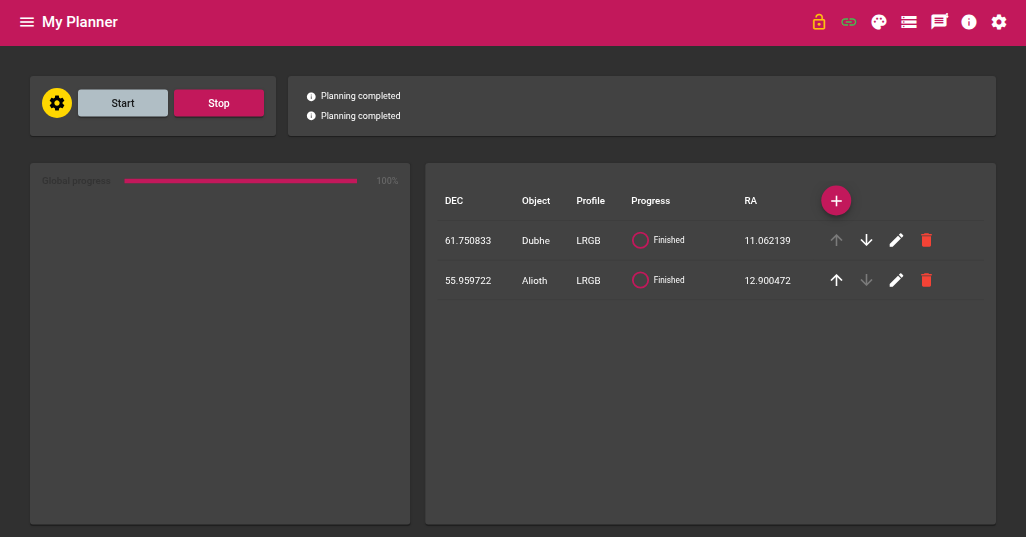
The Planner module orchestrates a multi-target astrophotography session. It executes a list of planning lines, delegating slewing to the Navigator module and acquisition to the Sequencer module in turn. For each target it automatically loads a sequencer profile. Before slewing to a target, it also checks that the target stays above a minimum elevation for the whole estimated duration of the sequence and is clear of the moon, skipping and later retrying targets that don’t meet these constraints.
Required devices
| Device | Role |
|---|---|
| GPS | Observer geographic coordinates and time |
Planning structure
A planning is made up of several lines. Each line defines:
| Column | Description |
|---|---|
| Object | Target name |
| RA | Right ascension of the target (J2000) |
| DEC | Declination of the target (J2000) |
| Profile | Sequencer profile to load for this target |
| Progress | Completion status of the current line |
Lines don’t have to be executed strictly top to bottom: a line that fails the visibility/moon check is skipped and retried later, once every other line has had its turn (see Line states below). They can be added manually or sent from the Navigator via the Add to planner action.
Parameters
Slave modules
| Parameter | Description |
|---|---|
| Sequencer instance | Name of the Sequencer module instance to drive |
| Navigator instance | Name of the Navigator module instance to drive |
Visibility constraints
| Parameter | Description |
|---|---|
| Minimum elevation (°) | The target must stay above this elevation for the whole estimated sequence duration, otherwise the line is skipped |
| Moon illumination threshold (%) | Moon avoidance only applies when the moon’s illuminated fraction is above this percentage |
| Moon separation threshold (°) | The line is rejected only if the target is closer than this and the moon illumination exceeds the threshold above |
| Max retries before giving up | A line that fails the visibility/moon check this many times is marked Failed and is no longer retried |
Algorithm
Start
- Check INDI connection and slave modules
- Mark all lines as Queued and reset retry counters
- Start the first line
Line execution
For each line of the planning:
- The Planner asks the Sequencer for the theoretical duration of the requested profile (without loading it), via a generic module query
- It checks that the target stays above the configured minimum elevation for that whole duration, and clear of the moon (illumination/separation thresholds) — if either check fails, the line is skipped (see Line states) and the Planner moves on
- Otherwise, it sets the Navigator’s target (RA, DEC, name)
- It loads the requested sequence profile into the Sequencer and sets the matching object name
- It triggers the Navigator’s Go to target action
- It waits for centering to complete (Navigator success event)
- It triggers the Sequencer’s Start sequence action
- It monitors acquisition progress and waits for the sequence to finish
- The line is marked Finished and the Planner moves on to the next workable line
Line states
| State | Meaning | Retried later? |
|---|---|---|
| Queued | Not yet attempted | — |
| Checking visibility | Elevation/moon check in progress | — |
| Slewing | Navigator centering on target | — |
| Skipped: <reason> | Failed the visibility/moon check | Yes, once every other line has had its turn |
| Failed: <reason> | Failed the visibility/moon check too many times (Max retries reached) | No — permanently excluded |
| Cancelled | The sequence was manually aborted while running (as opposed to finishing normally) | No — permanently excluded |
| Finished | Sequence completed successfully | No |
The Planner tells the two apart: if you abort the Sequencer directly while it’s running a planning line, that line is marked Cancelled and the Planner moves on to the next workable line — it is not mistaken for a successful completion, and it isn’t retried afterwards.
Planning complete
The Planner keeps cycling through the lines, retrying any still Skipped one, until every line is either Finished, Failed or Cancelled. At that point the global progress reaches 100 % and the module stops.
Stop propagation
Stopping the Planner (whether by clicking Stop or because a parent module such as Park Manager requests it) also aborts its slave modules: it sends the Sequencer’s Abort action and the Navigator’s Abort action, so an interrupted planning doesn’t leave an exposure or a slew running unattended.
Progress
| Indicator | Description |
|---|---|
| Global progress | Number of lines processed out of the total |
| Per-line progress | Current acquisition progress, relayed from the Sequencer |
Actions
| Action | Description |
|---|---|
| Start | Starts executing the planning from the first line |
| Stop | Stops the current planning |