Park Manager
Role
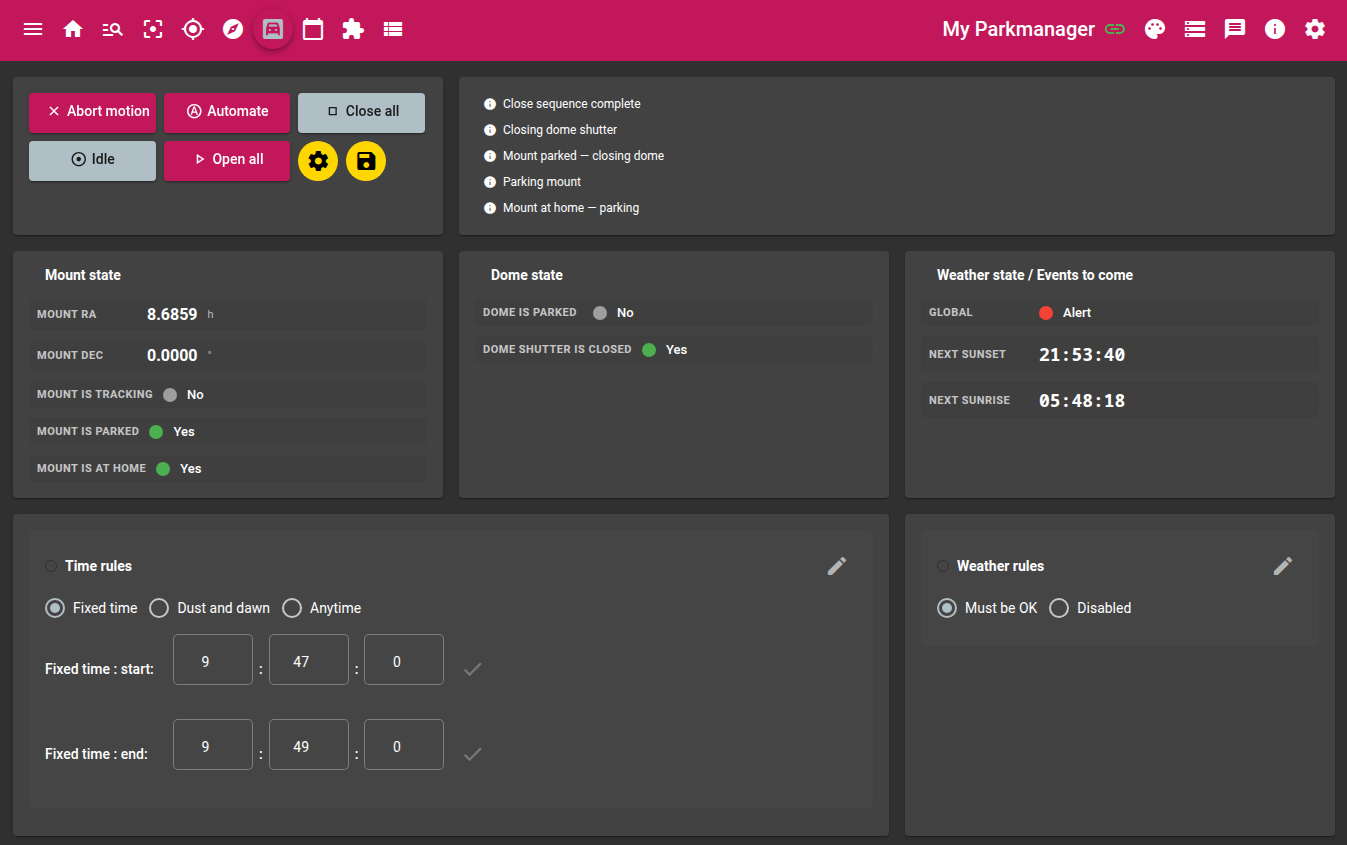
The Park Manager module orchestrates the complete opening and closing of the observatory: opening the dome shutter, unparking the mount, starting tracking — and in reverse order for closing. It can operate in manual mode (one-shot action) or in automatic mode driven by time and weather rules.
Required devices
| Device | Role |
|---|---|
| Dome | Shutter open/close, parking |
| Mount | Unparking, tracking, go-to home, parking |
| Weather station | Condition monitoring for automatic mode (optional) |
Parameters
Weather rules
| Parameter | Description |
|---|---|
| Must be OK | If enabled, opening is refused when weather is not green. During a session, weather degradation automatically triggers the closing sequence |
| Disabled | Disables weather monitoring (the weather station is ignored) |
Slave modules
| Parameter | Description |
|---|---|
| Planner instance | Name of the Planner module instance to stop when the closing sequence starts |
Time rules
These rules define the opening window in Automate mode. They are mutually exclusive.
| Parameter | Description |
|---|---|
| Fixed time | Fixed time window defined by a start time and an end time |
| Fixed time : start | Start time of the fixed window |
| Fixed time : end | End time of the fixed window (may be the next day — midnight rollover handled) |
| Dusk and dawn | Automatic window from sunset to sunrise (calculated from GPS coordinates) |
| Anytime | Permanent opening: the module opens as soon as it enters Auto mode and stays open |
Sequences
Opening sequence
- Weather check (if Must be OK rule is active)
- Open dome shutter
- Wait for shutter open confirmation
- Unpark mount
- Wait for unpark confirmation
- Start sidereal tracking
- Enter monitoring state (Open Monitoring)
Closing sequence
- Disable cooling on every connected device exposing a
CCD_COOLERswitch (not just the camera used by the Sequencer), and ask the Planner instance to stop - Stop sidereal tracking
- Send mount to home position
- Wait for home position reached
- Park mount
- Wait for park confirmation
- Close dome shutter
- Wait for shutter closed confirmation
The mount is always parked before closing the dome shutter. Never manually interrupt the sequence between these two steps.
Stopping the Planner in turn aborts the Sequencer (which itself aborts the Guider and the Focuser) and the Navigator — see the Planner documentation. This ensures the whole imaging chain comes to a safe stop before the observatory physically closes.
Emergency stop
The Abort action simultaneously sends a stop command to the mount (TELESCOPE_ABORT_MOTION) and to the dome (DOME_ABORT_MOTION), then returns to Idle mode.
Automatic mode
In Automate mode, the module evaluates every 2 seconds whether the observatory should be open or closed according to the configured time and weather rules.
flowchart TB
    ATTENTE([Waiting]) -->|"window active & weather OK"| OD

    subgraph OUV ["Opening sequence"]
        direction LR
        OD[Open shutter] --> OW[Wait shutter open] --> UD[Unpark mount] --> UW[Wait unpark] --> TR[Start tracking]
    end

    TR --> SURV([Monitoring])
    SURV -->|"window ended or weather degraded"| ST

    subgraph FER ["Closing sequence"]
        direction LR
        ST[Stop tracking] --> GH[Go to home] --> WH[Wait home] --> PM[Park mount] --> WP[Wait park] --> CD[Close shutter]
    end

    CD --> ATTENTE
    ATTENTE -->|Abort| IDLE([Idle])
    SURV -->|Abort| IDLE
| Situation | Action |
|---|---|
| Window open + observatory closed | Launch opening sequence |
| Window closed + observatory open | Launch closing sequence |
| Weather degraded during session | Launch closing sequence |
| End of sequence | Return to waiting — Auto mode is preserved |
After an opening or closing sequence, the module remains in Auto mode and continues monitoring conditions. There is no need to re-enable it manually.
Actions
| Action | Description |
|---|---|
| Open all | Launch the complete opening sequence |
| Close all | Launch the complete closing sequence |
| Automate | Enable automatic mode driven by configured rules |
| Abort motion | Emergency stop of all motions |
| Idle | Return to inactive mode without any action |
Displayed values
Mount
| Value | Description |
|---|---|
| Mount RA | Current right ascension |
| Mount DEC | Current declination |
| Mount is tracking | Sidereal tracking active |
| Mount is parked | Mount in parked position |
| Mount is at home | Mount at home position |
Dome
| Value | Description |
|---|---|
| Dome is parked | Dome in parked position |
| Dome shutter is closed | Shutter closed |
Weather & events
| Value | Description |
|---|---|
| Global | Overall weather status (green / orange / red) |
| Next sunset | Time of next sunset |
| Next sunrise | Time of next sunrise |