Navigator
Role
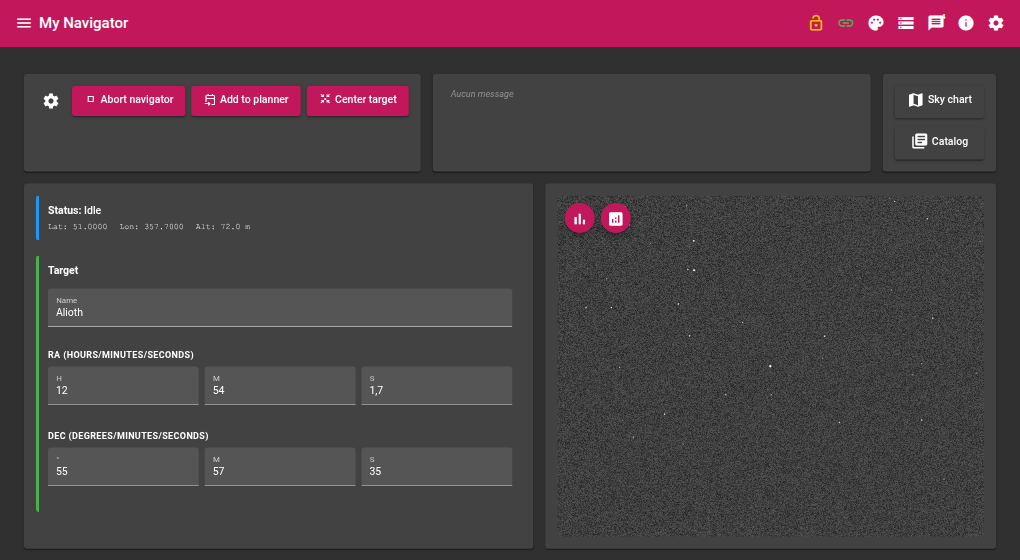
The Navigator module lets you search for an object in astronomical catalogues, slew the mount to that object, then precisely centre the field using a plate-solving loop. It can also send the selected target to the Planner module.
Required devices
| Device | Role |
|---|---|
| Camera | Image acquisition for plate solving |
| Mount | Reception of slew commands |
| GPS | Observer geographic coordinates and time |
Parameters
Acquisition
| Parameter | Description |
|---|---|
| Exposure | Exposure duration in seconds |
| Gain | Camera gain |
| Offset | Camera offset |
| Focal length | Optical focal length in mm — used to compute the solver image scale |
Centering
| Parameter | Description |
|---|---|
| Max iterations | Maximum number of slew → solve → correct cycles before giving up |
| Tolerance (arcsec) | Acceptable angular distance between the solved centre and the target |
| Sync mount after success | If enabled, syncs the mount coordinates to the solution after successful centering |
Slave modules
| Parameter | Description |
|---|---|
| Planner module instance | Name of the Planner module instance used by the Add to planner action |
How it works
Target search
Type a name or code in the Search object field. Available catalogues:
| Catalogue | Content |
|---|---|
| Messier | Messier catalogue objects |
| NGC | New General Catalogue |
| LDN | Lynds’ Catalogue of Dark Nebulae |
| SH2 | Sharpless catalogue (H II regions) |
| IC | Index Catalogue |
| Stars | Named stars |
Results appear in the Results grid with: catalogue, code, RA, DEC, magnitude, diameter, name, and alias. Clicking a row selects the target.
J2000 → current epoch conversion
As soon as a target is selected, its J2000 coordinates are converted to the current epoch (precession applied) and shown in Selection converted to now.
Centering loop
The Go to target action triggers the following sequence:
- The mount slews to the current-epoch converted coordinates
- The camera acquires an image, which is solved by the astrometric solver (StellarSolver / astrometry.net index files)
- The angular distance between the solved centre and the target is computed
- If the distance is below the Tolerance, centering is declared successful
- Otherwise, a corrective offset is computed and applied to the mount; the cycle restarts
This repeats until success or until the maximum number of iterations is reached.
If Sync mount after success is enabled, the module issues an INDI SYNC command after successful centering, which improves the accuracy of subsequent slews.
Live values
Mount position
| Value | Description |
|---|---|
| RA | Current mount right ascension |
| DEC | Current mount declination |
GPS location
| Value | Description |
|---|---|
| Altitude | Altitude of the observation site (m) |
| Latitude | Latitude of the observation site (°) |
| Longitude | Longitude of the observation site (°) |
GPS date and time
| Value | Description |
|---|---|
| UTC offset | Time zone offset |
| Date | Current date |
| Time | Current time |
Actions
| Action | Description |
|---|---|
| Go to target | Slews the mount to the selected target and starts the centering loop |
| Abort | Immediately stops the current slew or centering |
| Add to planner | Sends the current target to the Planner module |